
Yamaha Aventage Remote - Google Play
You'll be able to see results in few seconds.
Publisher Description
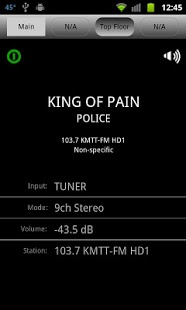
Control your Yamaha Aventage Receiver with this android application (also works with RX-V867). Disappointed with Yamaha's android offering, (though I am obviously biased) I find this far easier to use. Advantages include -- easier to control and use multiple zones, volume slider bar, play information & status combined on once screen, stereo presets report HD-radio station name, ability to hide unused sound modes and input sources, ability to set the "sleep" mode, a media interface screen that updates correctly, and does not use all of the confusing icons.
IF THE PROGRAM CRASHED ON LAUNCH try going into settings/applications and clearing the application's data.
NOTE: empirical testing suggests that the webserver contained in Yamaha's latest receivers have a very low capacity. The 'responsiveness' of this app goes way up if no desktop browsers are simultaneously querying the receiver.
This application is a re-write of RainShadow's earlier RX-V867 offering, this time with a slightly prettier user interface. Current limitations include -- does not auto detect receiver on network (you have to configure the receiver's IP address), controls SIRIUS_IR but not XM and SIRIUS input sources, no option yet to choose a "scene".
If you are unhappy with the purchase, I am more than happy to issue a refund. Feedback welcome.
About Yamaha Aventage Remote
The company that develops Yamaha Aventage Remote is RainShadow Tech. The latest version released by its developer is 1.0 .
To install Yamaha Aventage Remote on your Android device, just click the green Continue To App button above to start the installation process. The app is listed on our website since 2012-04-22 and was downloaded 0 times. We have already checked if the download link is safe, however for your own protection we recommend that you scan the downloaded app with your antivirus. Your antivirus may detect the Yamaha Aventage Remote as malware as malware if the download link to com.rainshadowtech.remote is broken.
How to install Yamaha Aventage Remote on your Android device:
- Click on the Continue To App button on our website. This will redirect you to Google Play.
- Once the Yamaha Aventage Remote is shown in the Google Play listing of your Android device, you can start its download and installation. Tap on the Install button located below the search bar and to the right of the app icon.
- A pop-up window with the permissions required by Yamaha Aventage Remote will be shown. Click on Accept to continue the process.
- Yamaha Aventage Remote will be downloaded onto your device, displaying a progress. Once the download completes, the installation will start and you'll get a notification after the installation is finished.
Program Details
System requirements
Download information
Pricing
Version History
version version
posted on 2012-04-22
Several fixes and updates
version version
posted on 2012-04-22
Disclaimer
Official Google Play Link
We do not host Yamaha Aventage Remote on our servers. We did not scan it for viruses, adware, spyware or other type of malware. This app is hosted by Google and passed their terms and conditions to be listed there. We recommend caution when installing it.
The Google Play link for Yamaha Aventage Remote is provided to you by apps112.com without any warranties, representations or guarantees of any kind, so access it at your own risk.
If you have questions regarding this particular app contact the publisher directly. For questions about the functionalities of apps112.com contact us.
